Diferencia entre revisiones de «Sensor de proximidad infrarrojo»
Ir a la navegación
Ir a la búsqueda
Sin resumen de edición |
Sin resumen de edición |
||
| Línea 1: | Línea 1: | ||
=Código= | =Código= | ||
< | <syntaxhighlight lang="c++" line copy> | ||
void setup() { | void setup() { | ||
pinMode(A0, INPUT_PULLUP); | pinMode(A0, INPUT_PULLUP); | ||
| Línea 33: | Línea 33: | ||
delay(50); | delay(50); | ||
} | } | ||
</ | </syntaxhighlight> | ||
* DFRobotDFPlayerMini | * DFRobotDFPlayerMini | ||
< | <syntaxhighlight lang="c++" line copy> | ||
/*************************************************** | /*************************************************** | ||
DFPlayer - A Mini MP3 Player For Arduino | DFPlayer - A Mini MP3 Player For Arduino | ||
| Línea 194: | Línea 194: | ||
</ | </syntaxhighlight> | ||
Revisión del 17:46 14 sep 2026
Código
void setup() {
  pinMode(A0, INPUT_PULLUP);
  pinMode(8, OUTPUT);
  Serial.begin(9600);
}

void loop() {
  digitalWrite(8, HIGH);
  delay(1);

  int max_enc = 0;
  for (int i = 0; i < 100; i++) {
    int v = analogRead(A0);
    if (v > max_enc) max_enc = v;

  }

  digitalWrite(8, LOW);
  delay(1);

  int max_apa = 0;
  for (int i = 0; i < 100; i++) {
    int v = analogRead(A0);
    if (v > max_apa) max_apa = v;
  }

  const int difference = max_apa - max_enc;

  Serial.println("0 300 " + String(difference));

  delay(50);
}
- DFRobotDFPlayerMini
/***************************************************
DFPlayer - A Mini MP3 Player For Arduino
 <https://www.dfrobot.com/product-1121.html>

 ***************************************************
 This example shows the basic function of library for DFPlayer.

 Created 2016-12-07
 By [Angelo qiao](Angelo.qiao@dfrobot.com)

 GNU Lesser General Public License.
 See <http://www.gnu.org/licenses/> for details.
 All above must be included in any redistribution
 ****************************************************/

/***********Notice and Trouble shooting***************
 1.Connection and Diagram can be found here
 <https://www.dfrobot.com/wiki/index.php/DFPlayer_Mini_SKU:DFR0299#Connection_Diagram>
 2.This code is tested on Arduino Uno, Leonardo, Mega boards.
 ****************************************************/

#include "Arduino.h"
#include "DFRobotDFPlayerMini.h"

#if (defined(ARDUINO_AVR_UNO) || defined(ESP8266))   // Using a soft serial port
#include <SoftwareSerial.h>
SoftwareSerial softSerial(/*rx =*/4, /*tx =*/5);
#define FPSerial softSerial
#else
#define FPSerial Serial1
#endif

DFRobotDFPlayerMini myDFPlayer;
void printDetail(uint8_t type, int value);

void setup()
{
#if (defined ESP32)
  FPSerial.begin(9600, SERIAL_8N1, /*rx =*/D3, /*tx =*/D2);
#else
  FPSerial.begin(9600);
#endif

  Serial.begin(115200);

  Serial.println();
  Serial.println(F("DFRobot DFPlayer Mini Demo"));
  Serial.println(F("Initializing DFPlayer ... (May take 3~5 seconds)"));


  while (!myDFPlayer.begin(FPSerial, /*isACK = */true, /*doReset = */true)) {  //Use serial to communicate with mp3.
    Serial.println(F("Unable to begin:"));
    Serial.println(F("1.Please recheck the connection!"));
    Serial.println(F("2.Please insert the SD card!"));
   // while(true){
    //  delay(0); // Code to compatible with ESP8266 watch dog.
    //}
    delay(1000);
  }


  Serial.println(F("DFPlayer Mini online."));

  myDFPlayer.volume(10);  //Set volume value. From 0 to 30
 // myDFPlayer.play(1);  //Play the first mp3
  myDFPlayer.loop(1);
}

void loop() {
  for (int i = 0; i < 30; i++) {
    myDFPlayer.volume(i);
    delay(100);
  }
  for (int i = 30; i > 0; i--) {
    myDFPlayer.volume(i);
    delay(100);
  }
  //delay(50);
 // static unsigned long timer = millis();

 // if (millis() - timer > 3000) {
//timer = millis();
  //  myDFPlayer.next();  //Play next mp3 every 3 second.
  //}

 // if (myDFPlayer.available()) {
  //  printDetail(myDFPlayer.readType(), myDFPlayer.read()); //Print the detail message from DFPlayer to handle different errors and states.
 // }
}

void printDetail(uint8_t type, int value){
  switch (type) {
    case TimeOut:
      Serial.println(F("Time Out!"));
      break;
    case WrongStack:
      Serial.println(F("Stack Wrong!"));
      break;
    case DFPlayerCardInserted:
      Serial.println(F("Card Inserted!"));
      break;
    case DFPlayerCardRemoved:
      Serial.println(F("Card Removed!"));
      break;
    case DFPlayerCardOnline:
      Serial.println(F("Card Online!"));
      break;
    case DFPlayerUSBInserted:
      Serial.println("USB Inserted!");
      break;
    case DFPlayerUSBRemoved:
      Serial.println("USB Removed!");
      break;
    case DFPlayerPlayFinished:
      Serial.print(F("Number:"));
      Serial.print(value);
      Serial.println(F(" Play Finished!"));
      break;
    case DFPlayerError:
      Serial.print(F("DFPlayerError:"));
      switch (value) {
        case Busy:
          Serial.println(F("Card not found"));
          break;
        case Sleeping:
          Serial.println(F("Sleeping"));
          break;
        case SerialWrongStack:
          Serial.println(F("Get Wrong Stack"));
          break;
        case CheckSumNotMatch:
          Serial.println(F("Check Sum Not Match"));
          break;
        case FileIndexOut:
          Serial.println(F("File Index Out of Bound"));
          break;
        case FileMismatch:
          Serial.println(F("Cannot Find File"));
          break;
        case Advertise:
          Serial.println(F("In Advertise"));
          break;
        default:
          break;
      }
      break;
    default:
      break;
  }

}
- Código sensor infrarrojo + DFPlayer + Filtro
/***************************************************
DFPlayer - A Mini MP3 Player For Arduino
 <https://www.dfrobot.com/product-1121.html>

 ***************************************************
 This example shows the basic function of library for DFPlayer.

 Created 2016-12-07
 By [Angelo qiao](Angelo.qiao@dfrobot.com)

 GNU Lesser General Public License.
 See <http://www.gnu.org/licenses/> for details.
 All above must be included in any redistribution
 ****************************************************/

/***********Notice and Trouble shooting***************
 1.Connection and Diagram can be found here
 <https://www.dfrobot.com/wiki/index.php/DFPlayer_Mini_SKU:DFR0299#Connection_Diagram>
 2.This code is tested on Arduino Uno, Leonardo, Mega boards.
 ****************************************************/

#include "Arduino.h"
#include "DFRobotDFPlayerMini.h"

#include <SoftwareSerial.h>
SoftwareSerial softSerial(/*rx =*/4, /*tx =*/5);
#define FPSerial softSerial


DFRobotDFPlayerMini myDFPlayer;
void printDetail(uint8_t type, int value);

void setup(){
  pinMode(A0, INPUT_PULLUP);
  pinMode(8, OUTPUT);
  Serial.begin(9600);


#if (defined ESP32)
  FPSerial.begin(9600, SERIAL_8N1, /*rx =*/D3, /*tx =*/D2);
#else
  FPSerial.begin(9600);
#endif

  Serial.println();
  Serial.println(F("DFRobot DFPlayer Mini Demo"));
  Serial.println(F("Initializing DFPlayer ... (May take 3~5 seconds)"));


  while (!myDFPlayer.begin(FPSerial, /*isACK = */true, /*doReset = */true)) {  //Use serial to communicate with mp3.
    Serial.println(F("Unable to begin:"));
    Serial.println(F("1.Please recheck the connection!"));
    Serial.println(F("2.Please insert the SD card!"));
   // while(true){
    //  delay(0); // Code to compatible with ESP8266 watch dog.
    //}
    delay(1000);
  }


  Serial.println(F("DFPlayer Mini online."));

  myDFPlayer.volume(20);  //Set volume value. From 0 to 30
  myDFPlayer.play(1);  //Play the first mp3
  myDFPlayer.enableLoop();
  //myDFPlayer.loop(1);


  pinMode (11, OUTPUT);
  int val = 51;


    analogWrite(11, val);


}

void loop() {
  digitalWrite(8, HIGH);
  delay(1);

  int max_enc = 0;
  for (int i = 0; i < 100; i++) {
    int v = analogRead(A0);
    if (v > max_enc) max_enc = v;

  }

  digitalWrite(8, LOW);
  delay(1);

  int max_apa = 0;
  for (int i = 0; i < 100; i++) {
    int v = analogRead(A0);
    if (v > max_apa) max_apa = v;
  }

   int difference = max_apa - max_enc;

  Serial.println("0 300 " + String(difference));

  delay(50);


  //  limitamos entre en 0 y 255
  if (difference < 0) difference = 0;
  if (difference > 255) difference = 255;

 analogWrite(11, difference);
}
- Avances Código sensor infrarrojo + DFPlayer + Filtro
/***************************************************
DFPlayer - A Mini MP3 Player For Arduino
 <https://www.dfrobot.com/product-1121.html>

 ***************************************************
 This example shows the basic function of library for DFPlayer.

 Created 2016-12-07
 By [Angelo qiao](Angelo.qiao@dfrobot.com)

 GNU Lesser General Public License.
 See <http://www.gnu.org/licenses/> for details.
 All above must be included in any redistribution
 ****************************************************/

/***********Notice and Trouble shooting***************
 1.Connection and Diagram can be found here
 <https://www.dfrobot.com/wiki/index.php/DFPlayer_Mini_SKU:DFR0299#Connection_Diagram>
 2.This code is tested on Arduino Uno, Leonardo, Mega boards.
 ****************************************************/

#include "Arduino.h"
#include "DFRobotDFPlayerMini.h"

#include <SoftwareSerial.h>
SoftwareSerial softSerial(/*rx =*/4, /*tx =*/5);
#define FPSerial softSerial


DFRobotDFPlayerMini myDFPlayer;
void printDetail(uint8_t type, int value);

int baselineVolume = 20;

int contadorDeLoopsEnCero = 0;

void setup(){
  // sensor1
  pinMode(A0, INPUT_PULLUP);
  pinMode(8, OUTPUT);
  // sensor2
  pinMode(A1, INPUT_PULLUP);
  pinMode(7, OUTPUT);
  // salida filtro -> vca2
  pinMode (10, OUTPUT);
  // salida filtro -> vca1
  pinMode (11, OUTPUT);
  Serial.begin(9600);


#if (defined ESP32)
  FPSerial.begin(9600, SERIAL_8N1, /*rx =*/D3, /*tx =*/D2);
#else
  FPSerial.begin(9600);
#endif

  Serial.println();
  Serial.println(F("DFRobot DFPlayer Mini Demo"));
  Serial.println(F("Initializing DFPlayer ... (May take 3~5 seconds)"));


  while (!myDFPlayer.begin(FPSerial, /*isACK = */true, /*doReset = */true)) {  //Use serial to communicate with mp3.
    Serial.println(F("Unable to begin:"));
    Serial.println(F("1.Please recheck the connection!"));
    Serial.println(F("2.Please insert the SD card!"));
   // while(true){
    //  delay(0); // Code to compatible with ESP8266 watch dog.
    //}
    delay(1000);
  }


  Serial.println(F("DFPlayer Mini online."));

  myDFPlayer.volume(0);  //Set volume value. From 0 to 30
  myDFPlayer.play(4);  //Play the first mp3
  myDFPlayer.enableLoop();
  //myDFPlayer.loop(1);

  int val = 51;
  analogWrite(10, val);
  //analogWrite(11, val);

}

void loop() {
  int difference;
  // difference = leerSensor(8, A0);
  difference = leerSensor(7, A1);
  delay(50);

  Serial.println("0 300 " + String(difference) + " " + myDFPlayer.readVolume());

  //
  // difference = difference -15;


  //entre 0 y 255, ni mas ni menos
  if (difference < 0) difference = 0;
  if (difference > 255) difference = 255;


  // Si el sensor no detecta nada durante un rato, baja volumen por software de a poco (volumen actual -1)
  if (difference < 5) {
    contadorDeLoopsEnCero++;
   // Serial.println("contador de loops: " + contadorDeLoopsEnCero);
    int currentVolume = myDFPlayer.readVolume();
    if (contadorDeLoopsEnCero > 30 && currentVolume > 0) {
        Serial.println("bajando el volumen: " + (currentVolume-1));
        myDFPlayer.volume(currentVolume-1);
    }
  } else {
    contadorDeLoopsEnCero = 0;
    if (myDFPlayer.readVolume() != baselineVolume) {
        Serial.println("resetando volumen al baseline: " + baselineVolume);
        myDFPlayer.volume(baselineVolume);
    }

  }

  analogWrite(10, difference);
  //analogWrite(11, difference);

 if (myDFPlayer.available()) {
    printDetail(myDFPlayer.readType(), myDFPlayer.read()); //Print the detail message from DFPlayer to handle different errors and states.
  }
}

int leerSensor(int pinLed, int pinSensor)
{
  digitalWrite(pinLed, HIGH);
  delay(1);

  int max_enc = 0;
  for (int i = 0; i < 100; i++) {
    int v = analogRead(pinSensor);
    if (v > max_enc) max_enc = v;

  }

  digitalWrite(pinLed, LOW);
  delay(1);

  int max_apa = 0;
  for (int i = 0; i < 100; i++) {
    int v = analogRead(pinSensor);
    if (v > max_apa) max_apa = v;
  }

   int difference = max_apa - max_enc;

  return difference;

}

void printDetail(uint8_t type, int value){
  switch (type) {
    case TimeOut:
      Serial.println(F("Time Out!"));
      break;
    case WrongStack:
      Serial.println(F("Stack Wrong!"));
      break;
    case DFPlayerCardInserted:
      Serial.println(F("Card Inserted!"));
      break;
    case DFPlayerCardRemoved:
      Serial.println(F("Card Removed!"));
      break;
    case DFPlayerCardOnline:
      Serial.println(F("Card Online!"));
      break;
    case DFPlayerUSBInserted:
      Serial.println("USB Inserted!");
      break;
    case DFPlayerUSBRemoved:
      Serial.println("USB Removed!");
      break;
    case DFPlayerPlayFinished:
      Serial.print(F("Number:"));
      Serial.print(value);
      Serial.println(F(" Play Finished!"));
      //myDFPlayer.next();
      break;
    case DFPlayerError:
      Serial.print(F("DFPlayerError:"));
      switch (value) {
        case Busy:
          Serial.println(F("Card not found"));
          break;
        case Sleeping:
          Serial.println(F("Sleeping"));
          break;
        case SerialWrongStack:
          Serial.println(F("Get Wrong Stack"));
          break;
        case CheckSumNotMatch:
          Serial.println(F("Check Sum Not Match"));
          break;
        case FileIndexOut:
          Serial.println(F("File Index Out of Bound"));
          break;
        case FileMismatch:
          Serial.println(F("Cannot Find File"));
          break;
        case Advertise:
          Serial.println(F("In Advertise"));
          break;
        default:
          break;
      }
      break;
    default:
      break;
  }
}
Circuitos
-
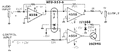 VCA usando un LDR

LDR VCA
| Id (mA) | R |
| 2 | 2k |
| 4 | 1.3k |
| 8 | 835 |
| 20 | 500 |
SPICE
Cuando estamos usando una salida analógica del Arduino, necesitamos filtrar la señal para estabilizarla. Esa simulación es para confirmar que las variaciones de la señal después del filtro son menos que 1 mV.
.title analogwrite

vin 1 0 ac 5

r1 1 2 1k
c1 2 0 1000u

.control
  ac dec 100 0.1 1e4
  plot mag(v(2))
  print mag(v(2))
.endc

.end